What Is On-Page SEO? A Complete Beginner’s Guide
On-Page SEO is one of the most important parts of Search Engine Optimization because it focuses on the elements you can directly control on your own website. It involves optimizing the content and HTML elements of individual web pages so that both search engines and users can easily understand what the page is about.
Before you start optimizing a page, it is important to understand search intent—the reason behind a user’s search. Even a perfectly optimized page may not perform well if it does not satisfy what people are actually looking for. For example, someone searching for “best digital marketing course” may want a comparison, a beginner-friendly guide, or a course recommendation. If your page does not match that intent, it will be harder to rank and less likely to keep visitors engaged.
Unlike Off-Page SEO, which focuses on building authority through backlinks and external signals, On-Page SEO is entirely about improving your own website. When done correctly, it helps search engines understand your content while also giving visitors a better browsing experience.
For example, if you publish an article about “Digital Marketing for Beginners,” On-Page SEO ensures that the page has a clear title, informative headings, relevant keywords, optimized images, internal links, and well-structured content. These improvements make the article easier to read and increase its chances of appearing in search results.
Why Is On-Page SEO Important?
Search engines aim to provide users with the most useful and relevant information. Even if your content is excellent, it may struggle to rank if it is poorly organized or difficult for search engines to understand.
A well-optimized page can:
- Improve search engine rankings.
- Increase organic website traffic.
- Enhance the user experience.
- Keep visitors engaged for longer.
- Encourage users to explore more pages.
- Increase conversions and lead generation.
Good On-Page SEO benefits both search engines and your visitors by making your content clear, accessible, and valuable.
On-Page SEO vs Off-Page SEO
A simple comparison can help beginners understand the difference between these two important SEO areas.
| On-Page SEO | Off-Page SEO |
|---|---|
| Content optimization. | Backlinks. |
| Headings. | Brand mentions. |
| Images. | Social signals. |
| Internal links. | External authority. |
| Website speed. | Guest posting. |
On-Page SEO focuses on improving the content and structure of your own website, while Off-Page SEO focuses on building trust and authority from outside sources.
Key Elements of On-Page SEO
1. High-Quality Content
Content is the foundation of On-Page SEO. Every page should provide original, accurate, and valuable information that answers the reader’s questions. Instead of writing only to include keywords, focus on solving real problems and offering practical advice.
The best content also matches search intent. If users want a beginner-friendly explanation, give them a clear and simple guide. If they want a comparison, provide a structured comparison. If they want a step-by-step tutorial, make sure your content walks them through the process in a logical way.
For example, rather than writing a short paragraph explaining SEO, create a detailed guide with examples, common mistakes, and actionable tips that readers can apply.
2. Keyword Optimization
Keywords help search engines understand the topic of your page. Before writing, research the words and phrases your audience is searching for and use them naturally throughout your content.
Include your primary keyword naturally in important places such as:
- Page title.
- Main heading (H1).
- Introduction.
- Subheadings where relevant.
- Conclusion.
Avoid keyword stuffing, as repeating the same phrase unnaturally can make your content difficult to read and may negatively affect user experience.
3. Title Tags
The title tag is one of the first things users see in search engine results. It should clearly describe the page while encouraging people to click.
Example:
Good Title:
What Is On-Page SEO? A Complete Beginner’s Guide
Poor Title:
SEO Article 2026
A descriptive title helps both readers and search engines understand the page’s purpose. It is also a good idea to write a unique title tag for every page on your website so that each page has a clear focus.
4. Meta Description
A meta description is a brief summary of your page that may appear below the title in search results. Although it is not a direct ranking factor, a clear and informative description can improve click-through rates.
Write a concise description that explains what readers will learn from the page. Avoid duplicate meta descriptions across multiple pages, because each page should have its own unique summary.
5. Heading Structure
Headings organize your content into logical sections, making it easier to read and understand.
A typical structure includes:
- H1 for the main title.
- H2 for major sections.
- H3 for supporting topics.
Clear headings improve readability and help search engines identify the main topics covered on the page. They also make it easier for readers to scan the content and find the information they need quickly.
6. Internal Linking
Internal links connect one page of your website to another. They help visitors discover related content and allow search engines to crawl your website more effectively.
For example, if you mention keyword research in an article about On-Page SEO, you can link to your separate guide explaining keyword research in detail.
Using descriptive anchor text is also important. Instead of writing “click here,” use text that clearly explains what the linked page is about. This helps both users and search engines understand the connection between pages.
7. Image Optimization
Images improve the visual appeal of your content, but they should also be optimized.
Best practices include:
- Using descriptive file names.
- Adding informative alt text.
- Compressing images to improve page speed.
- Choosing relevant images that support the content.
Optimized images can improve accessibility and help your pages appear in image search results. They also make your content more engaging and easier to understand.
8. URL Structure
A clean and descriptive URL makes it easier for users and search engines to understand the page topic.
Example:
Good URL:
example.com/on-page-seo-guide
Poor URL:
example.com/page?id=12345
Simple URLs are easier to remember, share, and understand. They also look more professional and trustworthy.
9. Mobile-Friendly Design
Most users browse websites on mobile devices. Your pages should display correctly on smartphones and tablets, with readable text, responsive layouts, and easy-to-click buttons.
A mobile-friendly website provides a better user experience and supports stronger search performance. If visitors have to zoom in, scroll awkwardly, or struggle with broken layouts, they are more likely to leave the page quickly.
10. Page Speed
Visitors expect websites to load quickly. Slow pages often cause users to leave before reading the content.
Improving page speed by compressing images, enabling browser caching, and minimizing unnecessary code can improve both user experience and search performance. Faster pages are easier to use and more likely to keep visitors engaged.
On-Page SEO at a Glance
This quick visual summary shows how the main parts of On-Page SEO work together.
| Core Area | What to Optimize | Why It Matters |
|---|---|---|
| Content. | Original, helpful, intent-matched information. | Helps users find answers. |
| Keywords. | Natural placement in titles, headings, and body text. | Helps search engines understand the topic. |
| Titles & Meta Descriptions. | Clear, unique, and clickable text. | Improves visibility and click-through rate. |
| Headings. | Logical H1, H2, and H3 structure. | Improves readability and organization. |
| Images. | File names, alt text, and compression. | Supports accessibility and speed. |
| Internal Links. | Related pages with descriptive anchor text. | Helps users and crawlers navigate. |
| URLs. | Short, clean, and descriptive slugs. | Makes pages easier to understand. |
| Speed & Mobile. | Fast loading and responsive design. | Improves user experience and rankings. |
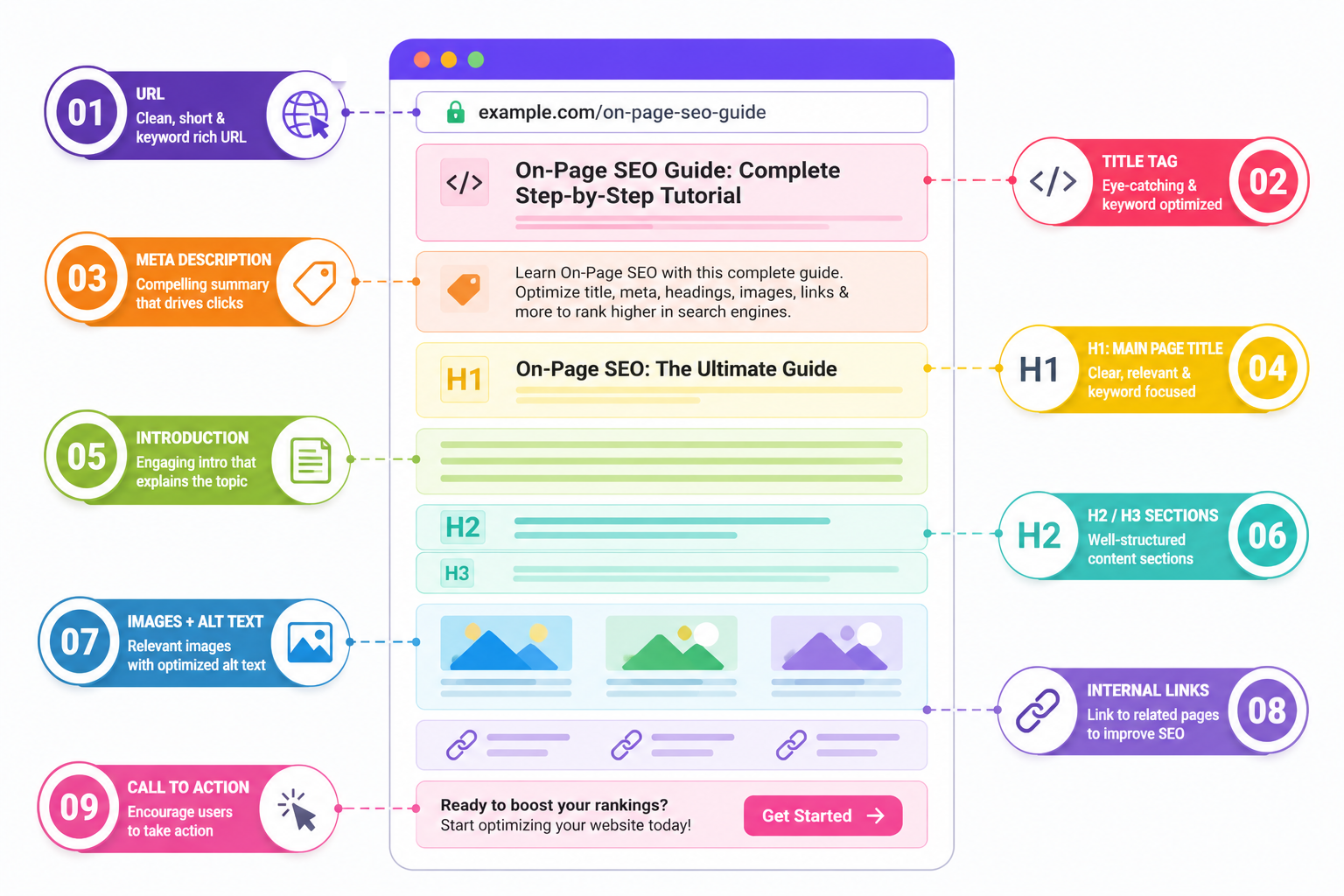
Webpage Anatomy Diagram
A well-optimized page usually follows a clear structure like this:
┌──────────────────────────────────────────────┐
│ URL: example.com/on-page-seo-guide          │
├──────────────────────────────────────────────┤
│ Title Tag                                   │
├──────────────────────────────────────────────┤
│ Meta Description                            │
├──────────────────────────────────────────────┤
│ H1: Main Page Title                          │
├──────────────────────────────────────────────┤
│ Introduction                                │
├──────────────────────────────────────────────┤
│ H2 / H3 Sections                             │
├──────────────────────────────────────────────┤
│ Images + Alt Text                            │
├──────────────────────────────────────────────┤
│ Internal Links                               │
├──────────────────────────────────────────────┤
│ Call to Action                               │
└──────────────────────────────────────────────┘
This simple structure helps search engines understand the page and helps readers move through the content more easily.
Before vs After Optimization
Here is a simple illustration of how On-Page SEO can improve a page:
| Before Optimization | After Optimization |
|---|---|
| Generic title. | Clear title with the main keyword. |
| Thin content. | Helpful content that answers search intent. |
| No internal links. | Related articles linked naturally. |
| Large uncompressed images. | Optimized images with alt text. |
| Slow loading page. | Faster page speed. |
| Confusing headings. | Clear H1, H2, and H3 structure. |
| Weak URL. | Short, descriptive URL. |
Even small improvements like these can make a page easier to read, easier to crawl, and more likely to perform well in search results.
SEO Checklist Infographic
Use this quick checklist to review your pages before publishing or updating them.
| On-Page SEO Check | Done? |
|---|---|
| Unique title tag. | ☐ |
| Optimized meta description. | ☐ |
| One clear H1 heading. | ☐ |
| Proper H2 and H3 headings. | ☐ |
| Primary keyword used naturally. | ☐ |
| Search intent matched. | ☐ |
| Internal links added. | ☐ |
| Images optimized. | ☐ |
| Descriptive alt text included. | ☐ |
| Mobile-friendly design. | ☐ |
| Fast loading speed. | ☐ |
| Updated and accurate content. | ☐ |
| Unique title tags for every page. | ☐ |
| No duplicate meta descriptions. | ☐ |
| Descriptive anchor text used. | ☐ |
What I Learned from Optimizing a Page
When I optimized one of my own blog posts, I initially focused only on adding keywords. Even after making those changes, the article still struggled to rank.
After that, I took a more complete approach. I improved the heading structure, compressed the images, added internal links, and rewrote sections so they matched search intent more closely. Over time, the page began receiving more impressions in Search Console.
That experience showed me that On-Page SEO is not just about keywords. It is about improving the entire page so that it becomes more useful, easier to read, and more relevant to the person searching.
Small Case Study
A blog post originally ranked on page four of search results. Instead of rewriting the entire article from scratch, the page was improved step by step. The title was made clearer, internal links were added, images were compressed, and the content was updated to better match what users were searching for.
Over the following months, the page gradually moved closer to page one. This kind of improvement does not usually happen overnight, but it shows how strong On-Page SEO can make a real difference when applied consistently.
Common On-Page SEO Mistakes
Many website owners unintentionally reduce their chances of ranking by making avoidable mistakes, such as:
- Publishing thin or incomplete content.
- Copying content from other websites.
- Repeating keywords excessively.
- Ignoring heading structure.
- Uploading large, uncompressed images.
- Forgetting internal links.
- Using confusing URLs.
- Neglecting mobile optimization.
- Allowing pages to load slowly.
- Writing content that does not match search intent.
Regularly reviewing and improving your pages helps avoid these issues.
Best Practices for On-Page SEO
To create pages that are both user-friendly and search-engine friendly:
- Write original, helpful content.
- Understand and match the user’s search intent.
- Use keywords naturally.
- Organize content with clear headings.
- Add relevant images and optimize them.
- Link to related pages on your website.
- Improve loading speed.
- Make your website mobile-friendly.
- Use descriptive anchor text.
- Write unique title tags for every page.
- Avoid duplicate meta descriptions.
- Update older content with fresh information.
Tools for On-Page SEO
Beginners do not need dozens of tools to get started. A few reliable ones can make the process much easier.
| Tool | Purpose |
|---|---|
| Google Search Console. | Monitor search performance and indexing. |
| Google Analytics. | Understand visitor behavior. |
| PageSpeed Insights. | Test loading speed. |
| Screaming Frog. | Find technical and on-page issues. |
| Yoast SEO or Rank Math. | Optimize WordPress pages. |
These tools help you identify problems, measure improvements, and make smarter SEO decisions over time.
Why Helpful Content Matters Most
Google’s goal is to reward content that genuinely helps users. Instead of optimizing only for search engines, focus on creating pages that answer questions clearly and provide a great user experience.
When your content is useful, well-structured, and easy to read, it naturally supports better SEO performance. Helpful content keeps visitors on the page longer, encourages them to explore more of your website, and increases the chances that they will trust your brand.
Frequently Asked Questions
What is the difference between On-Page SEO and Technical SEO?
On-Page SEO focuses on the content and visible elements of a page, such as headings, keywords, images, and internal links. Technical SEO focuses on the behind-the-scenes structure of the website, including crawlability, indexing, site speed, mobile usability, and security.
Does On-Page SEO improve rankings?
Yes. On-Page SEO can improve rankings because it helps search engines understand your content and helps users find the information they need more easily. Better relevance, structure, and user experience often lead to stronger search performance.
How often should I update On-Page SEO?
You should review important pages regularly, especially if search trends, competition, or your content changes. Many websites benefit from updating key pages every few months to keep them accurate, useful, and aligned with search intent.
Is keyword density still important?
Keyword density is not the main focus of modern SEO. Instead of counting how many times a keyword appears, it is better to use keywords naturally and make sure the content fully covers the topic in a helpful way.
Can I do On-Page SEO without coding?
Yes. Most On-Page SEO tasks can be done without coding knowledge. You can optimize titles, headings, content, images, URLs, and internal links using a content management system like WordPress or similar website builders.
Which On-Page SEO factor is most important?
High-quality content that matches search intent is usually the most important factor. If your page does not answer the user’s question well, other optimizations will have limited impact. Content, structure, and user experience should work together.
Conclusion
On-Page SEO is the foundation of a successful SEO strategy. It focuses on creating valuable content, organizing information clearly, and improving the overall user experience. By optimizing the elements you control—such as content, headings, images, internal links, and page performance—you make it easier for both visitors and search engines to understand your website.
Rather than trying to rank by adding more keywords, focus on creating pages that genuinely help your audience and satisfy search intent. Over time, consistent improvements in On-Page SEO can increase organic traffic, strengthen your website’s authority, and support long-term online growth.
If you’re just getting started, optimize one page at a time. Focus on creating helpful content, matching search intent, improving page speed, and linking related articles together. Consistent improvements are more effective than trying to optimize everything at once.